Claude Skills Explained
Welcome back to another Articles by Victoria, the place where I randomly write things I'm curious about. Lately, I've been very curious about Claude Skills.
This article and any AI-related articles to a new series called "AI, but make it make sense". The aim of this series is to demystify anything AI, for non-techies and techies. Feel free to always reach out if there's a specific topic you'd like me to cover or elaborate in this series. Thanks!
In this article, let's unpack what Claude Skills actually are, why are they being so hyped, and its use cases to unlock workflows.
What Are Claude Skills
Anthropic recently introduced something called Skills, and at first glance to me, it seems to be a specialized context engineering capability for Claude.
Read more about context engineering in this article.
To put it simply, a Skill is basically a structured set of instructions that tells Claude how to do something. By creating a SKILL.md file in your codebase, AKA a Markdown file with instructions, you can add specific instructions on what Claude should do. For example, below is an explain-code skill:
---
name: explain-code
description: Explains code with visual diagrams and analogies. Use when explaining how code works, teaching about a codebase, or when the user asks "how does this work?"
---

When explaining code, always include:

1. **Start with an analogy**: Compare the code to something from everyday life
2. **Draw a diagram**: Use ASCII art to show the flow, structure, or relationships
3. **Walk through the code**: Explain step-by-step what happens
4. **Highlight a gotcha**: What's a common mistake or misconception?

Keep explanations conversational. For complex concepts, use multiple analogies.
A skill doesn't just have to be a Markdown document. They can also be in the form of scripts. In a codebase, this can look like:
.claude/skills/
├── SKILL.md           # Main instructions (required)
├── template.md        # Template for Claude to fill in
├── examples/
│   └── sample.md      # Example output showing expected format
└── scripts/
    └── validate.sh    # Script Claude can execute
Note: It is good to let Claude automatically discover skills by including them in .claude/skills/ directories.
As you can see, when you read or hear about "Skills", it is not as complicated as it seems. Basically, it's organized context.
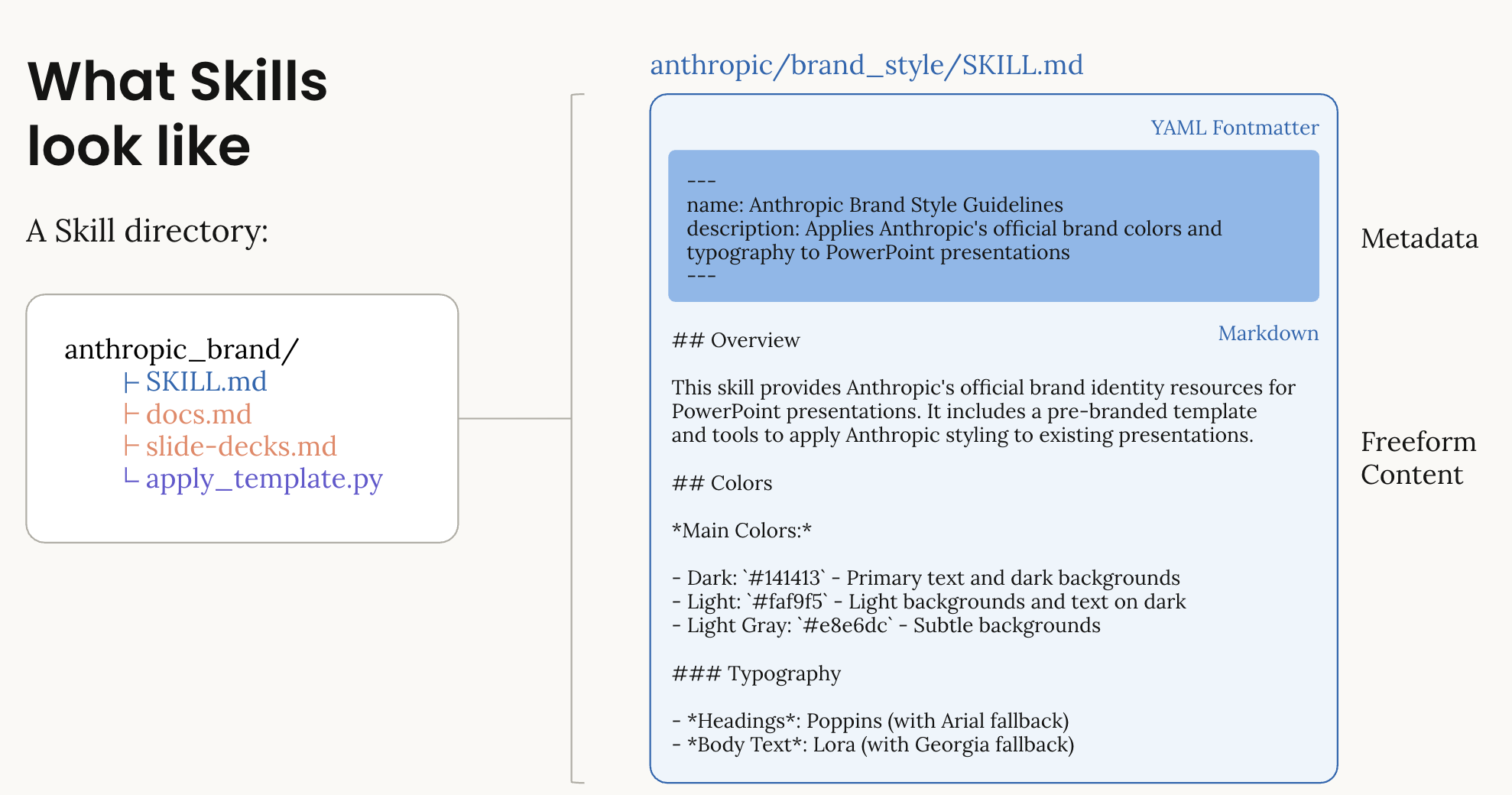
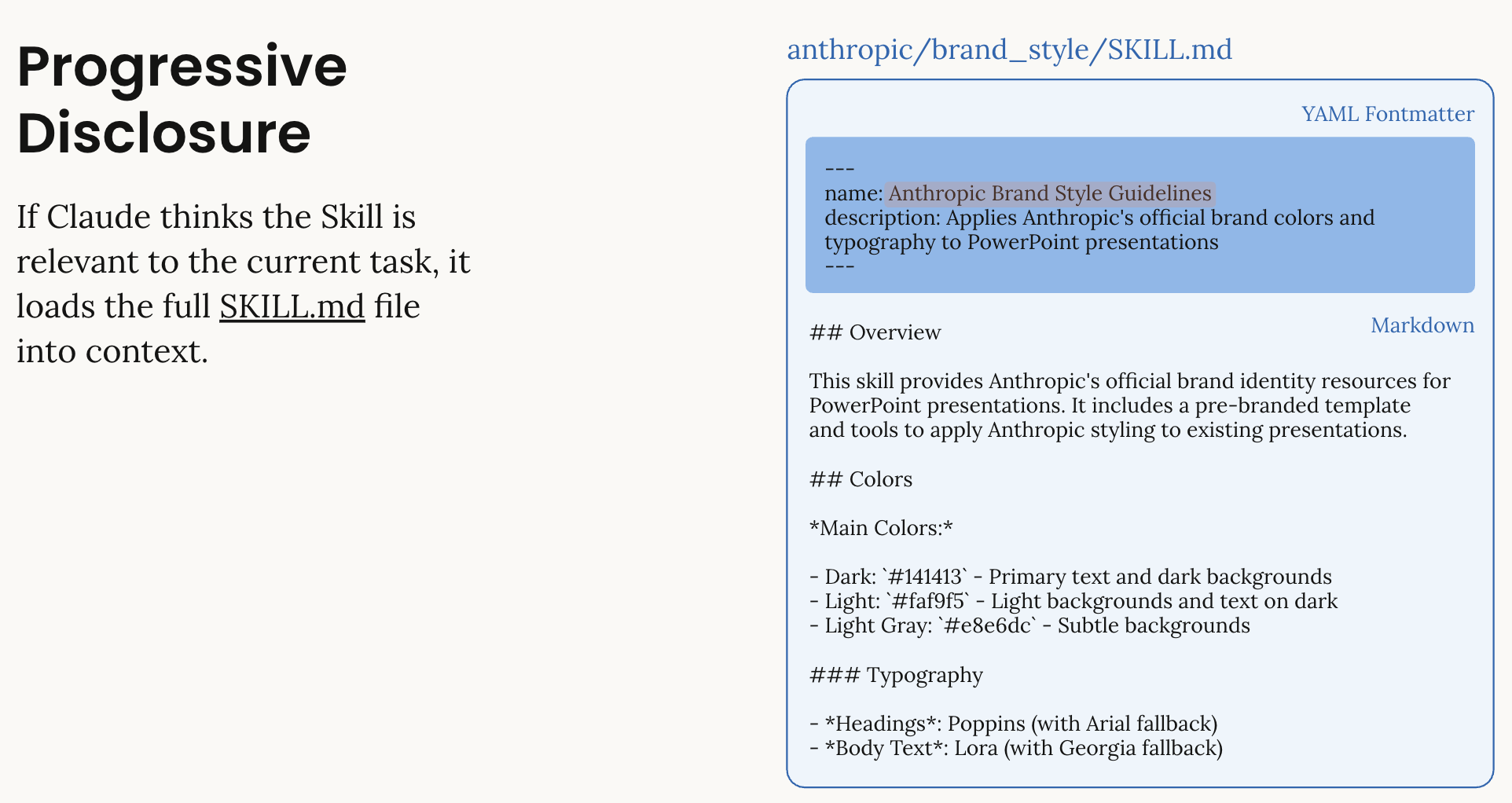
Whenever you prompt, Claude can scan available skills at the beginning of a session, read a short description of each one, and then only load the full details when it actually needs them. So instead of bloating every conversation with massive instructions, it stays lightweight until the moment a skill becomes relevant.
What Makes Claude Skills so Good
What I personally love about this design is how simple it is. There's no heavy protocol to implement and no giant infrastructure requirement. If you're looking to start building a prototype, you won't need a 50-page specification document for Claude Code to build something.
If you've spent any time working with large language models, you already know that they respond incredibly well to well-written instructions. Claude Skills is exactly about leveraging that, pre-determined and specific repeatable actions you want the LLM to do.
That feels very aligned with how LLMs actually work.
Another subtle but powerful detail is token efficiency. Claude doesn't load every skill fully into context. If you have read my article on context engineering, we learned that too much context can create hallucinations. Instead, Claude Skills reads short metadata upfront and only expands when necessary. This reduces over-context engineering, especially as workflows get more complex.
Types of Claude Skills
You can think of Skills in a few buckets.
1. Workflow Skills
Encode processes. How your team structures reports. How you clean data. How you prepare investor updates.
2. Tooling Skills
Bundle executable scripts. For example, generating a PowerPoint, validating a file size, merging PDFs.
Anthropic actually provides pre-built Skills for common document tasks, you can use these skills immediately in your workflows:
- PowerPoint (
pptx), create and edit slides, analyze content - Excel (
xlsx), create and edit spreadsheets, analyze content - Word (
docx), create and edit docs, analyze content - PDF (
pdf), create formatted reports in PDF
These are available on claude.ai and via the API.
3. Domain Expertise Skills
This is where organizations get real value. Internal knowledge. Compliance frameworks. Technical standards. Sales playbooks.
More custom skills and instructions to setup is on: https://platform.claude.com/cookbook/skills-notebooks-01-skills-introduction
How to use Claude Skill
Skills run inside a code execution container because that's the environment where Claude has filesystem access, and can read your Skill directory, and can execute scripts if needed.
So the typical flow looks something like this, where we are using the pre-build skill xlsx to create and edit spreadsheets:
# Use client.beta.messages.create() for Skills support
response = client.beta.messages.create(
    model="claude-sonnet-4-5",
    max_tokens=4096,
    container={
        "skills": [
            # this is where we define the skill to use
            {"type": "anthropic", "skill_id": "xlsx", "version": "latest"}
        ]
    },
    # make sure we use code_execution tool
    tools=[{"type": "code_execution_20250825", "name": "code_execution"}],
    messages=[{"role": "user", "content": "Create an Excel file..."}],
    # Use betas parameter instead of extra_headers
    betas=["code-execution-2025-08-25", "files-api-2025-04-14", "skills-2025-10-02"]
)
What the code above does is the following:
- You send a request using the beta messages API.
- You specify the Skill you want to make available (i.e.
xlsx) in thecontainerparameter. - You include the
code_executiontool, it is necessary to use Skills - You enable the relevant beta flags.
Then here's what actually happens behind the scenes:
- Claude receives your request with the Skill loaded into its environment.
- If the Skill requires generating something like an Excel file, it uses the code execution tool to create it.
- The response includes a
file_id. - You then use the Files API to download that generated file.
Note: this is the current way to use Skills at the time of writing this article, February 2026. This may be subjected to change.
Claude Skills vs MCP
Now let us address the comparison everyone is making. Is Claude Skills the same as MCP?
The short answer is: No.
MCP is a protocol on how agents can work with third party apps. It's structured, formal, and architecture-heavy. It defines how hosts, clients, tools, and resources interact. A more detailed article on what MCP is and its architecture can be found in this article, Understanding MCP and A2A.
Claude Skills, on the other than, is more lightweight and more of a structured form of context engineering. Instead of a protocol, you're writing structured instructions and optionally bundling scripts.
Another difference is token efficiency. Some MCP implementations consume large chunks of context such as GitHub's MCP. When this happens, it can eat up an enormous amount of context just by existing. Which means tens of thousands of tokens before we've even really started the actual task. And once that much space is already taken, there isn't much room left in the context window for the model to think, reason, or produce something genuinely useful. Skills rely on what Anthropic calls as progressive disclosure, which keeps things lean.
To be honest, I don't think Skills and MCP are comparable. There is no "this one is better than the other", because they operate at different layers. Skills live at the context and execution layer. They shape how Claude behaves by packaging instructions, workflows, and optional scripts inside the environment it's already running in.
MCP lives at the integration layer. It's about connecting models to external systems in a standardized, protocol-driven way. It's infrastructure.
If you're a builder who values speed and simplicity, Skills will probably feel more approachable. You can experiment by writing a well-structured SKILL.md, maybe add a script, drop it into your environment, and you're off. The barrier to entry is low, and iteration is fast.
Where MCP has a real advantage is when you need standardized, cross-system integrations.
For example, if you're exposing internal company tools, databases, or services to multiple models or applications in a consistent way, MCP gives you a formal interface. It's better suited for enterprise-scale scenarios where governance, shared access, authentication, and structured tool definitions matter.
Now here's a question for you: can you use both Skills and MCP together?
My answer would be: Yes of course, in fact, your workflows can be even more powerful this way.
Conclusion
What excites me about Claude Skills isn't that they magically make Claude smarter. It's that they give us a structured and lean way to package knowledge, context and executable actions for the LLM.
They provide consistent output and intentional system design, which is beneficial when working in teams. Because instead of repeating instructions endlessly, we build reusable capabilities.
Thanks for reading! I'm curious to know your own personal thoughts and experiences on this topic! Feel free to connect, send me an email (my inbox is always open) or let me know in the comments! Cheers!
References
- https://platform.claude.com/docs/en/agents-and-tools/agent-skills/overview
- https://code.claude.com/docs/en/skills
- https://platform.claude.com/cookbook/skills-notebooks-01-skills-introduction
- https://support.claude.com/en/articles/12512198-how-to-create-custom-skills