
Context Engineering 101 for GitHub Copilot

The other day, I was teaching a junior developer how to vibe code. We were sitting side by side, both using GitHub Copilot. Same IDE and same model. Yet the experience could not have been more different.
They kept getting stuck in error loops. Copilot would suggest something, it would fail, they would tweak the prompt, then it would respond with another confident but slightly unoptimized solution, and the loop continued. After a while, Copilot stopped being helpful and started being too much.

At first, I thought this was about prompts. Maybe they were not asking clearly enough.
But after watching closely, I realised the real difference was more accurately, how much context we were engineering before asking it to generate anything.
Hello everyone. Welcome to another Articles by Victoria, the place where I randomly write things I am curious about. In this article, I want to talk about a new term that’s been going around these days called “context engineering”, which is essentially prompt engineering 2.0.
So let’s dive into what it actually is, why it matters much more now in 2026, what GitHub and VS Code have already built to support it, and how to apply it practically with GitHub Copilot.
What is context engineering?
There are many definitions of this new term. When talking about context engineering, it is not talking about better prompts. CEO of Braintrust Ankur Goyal defines context engineering as:
Bringing the right information (in the right format) to the LLM.
Or as Anthropic states in more detail,
Context engineering refers to the set of strategies for curating and maintaining the optimal set of tokens (information) during LLM inference, including all the other information that may land there outside of the prompts.
AKA it is about shaping the information environment the model operates in.
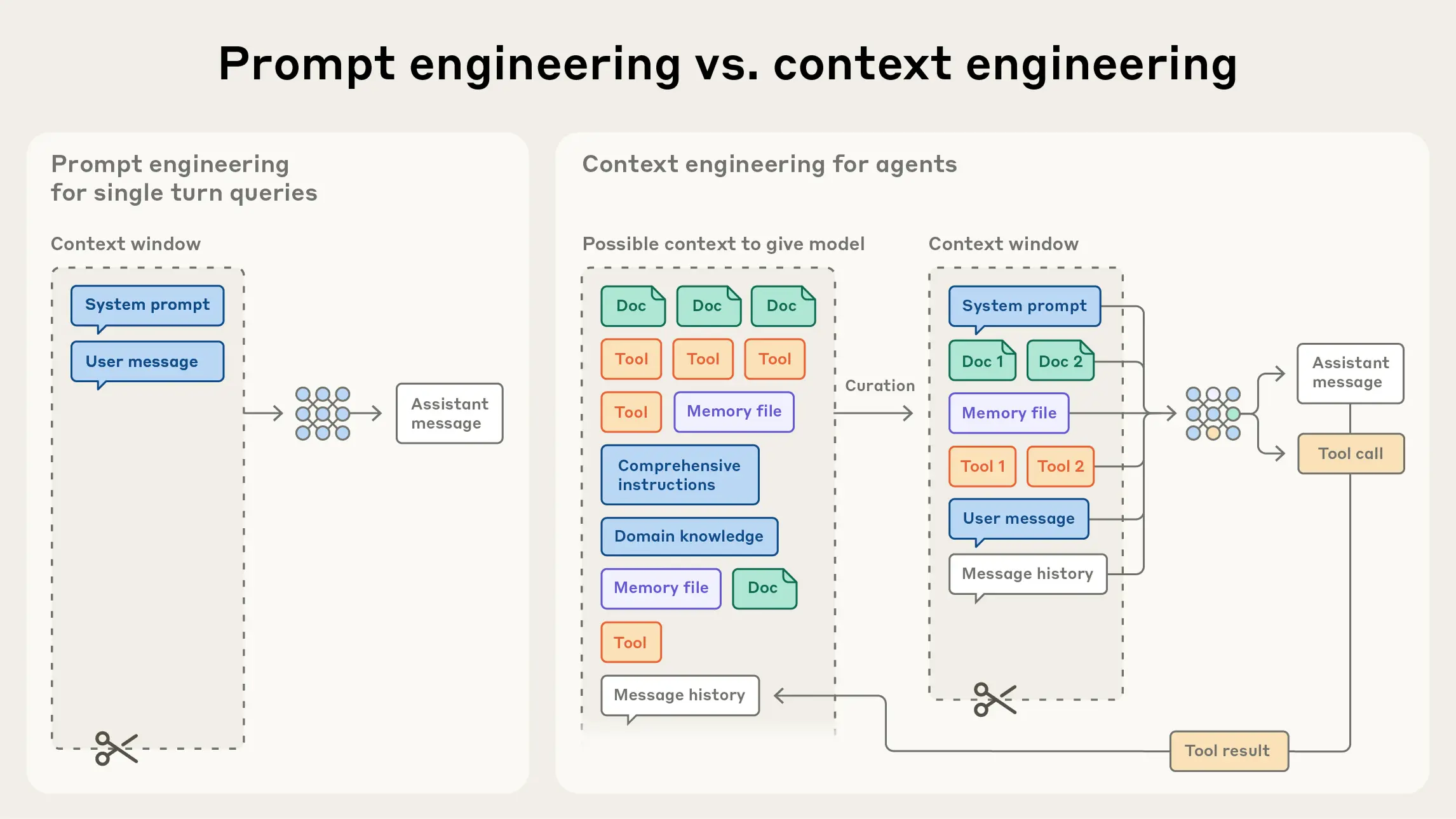
If you have used coding assistants such as GitHub Copilot, Windsurf, and more, you may notice it does not respond only to the sentence you type. It builds its answer from a mixture of signals, including:
The code before and after your cursor
The file you are editing
Other open tabs in your editor
Related files AI assistant automatically pulls in
Comments, docstrings, and naming conventions
The overall structure of your repository
This is why according to GitHub, Copilot is a contextual system, not a chatbot. It is continuously gathering context from your VSCode workspace and using that to predict the most likely next piece of code. If that context is weak, outdated, or contradictory, Copilot will still respond. It just responds by “guessing,” which is where productivity can go wrong with vibe coding.
Why this matters more in 2026
Honestly, we’ve all read those articles on “How to Prompt Engineer” in 2023-2025 and we’ve probably seen a few anatomy of a prompt type of pictures circulating around.
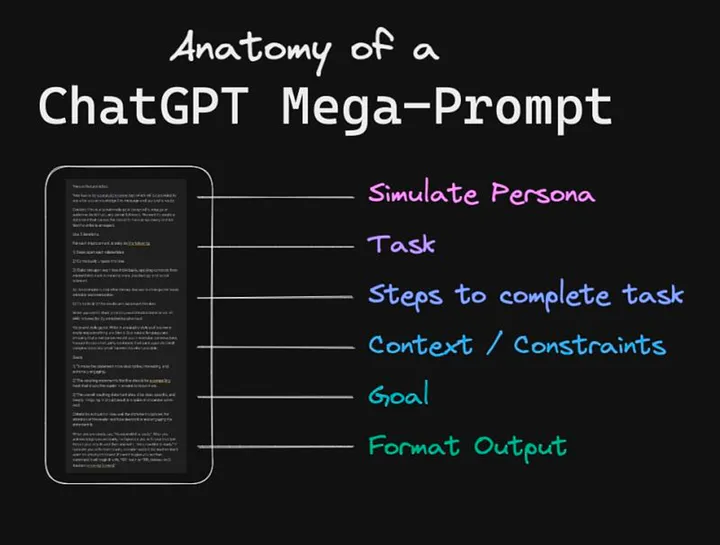
In 2026, AI models are far more capable than when Copilot first launched. But that power comes with a tradeoff.
Modern models are extremely good at pattern matching. They will confidently continue whatever pattern you show them, whether that pattern is good or… bad.
Because I’ve been using GitHub Copilot since day one, I know they have invested heavily in making Copilot smarter about context. It now looks beyond a single file, automatically retrieves relevant code from your workspace, and prioritises nearby and recently edited files when generating suggestions.
VS Code has also made context more explicit. Features like selecting code before invoking Copilot, inline chat scoped to a file, and adding workspace context are all designed to help you control which context to prioritize at any given moment. But none of this fixes unclear intent or ambiguous context.
If your codebase does not tell a coherent story, Copilot will create one.
An example: vague context vs engineered context
Here is a very common starting point, let’s say you want Copilot to generate code based on your comment:
# create auth middleware
From Copilot’s perspective, this could mean anything. Different frameworks, auth strategies, error handling styles.
Now compare that to this:
# Middleware that validates JWT tokens from the Authorization header
# Uses the existing verify_token utility
# Returns a standard 401 JSON response if validation fails
Nothing about this is fancy or overly technical. But it dramatically reduces ambiguity.
This aligns directly with GitHub’s recommendation to use comments and docstrings to express intent and constraints, not just describe the function name. Copilot performs best when it understands why the code exists, not just what it should do.
How to Context Engineer
This was the key lesson for my junior developer because they kept rewriting prompts. And my solution was not “write better prompts”, but “stop making the AI start from zero every time”.
According to GitHub’s blog post, context engineering starts with custom instructions.
Instead of reminding Copilot over and over how your team writes code, you can define those expectations once in a document so that everyone (including Copilot) are on the same page. Think about how many times you have typed things like:
“Can you use our existing error format and…”
“Following up with the implementation of xxx feature…”
“Once again, the xxx feature that we talked about where…”
That repetition of context is not only time-consuming, but ineffective when pair programming with Copilot.
Step 1: Create a copilot-instructions file
In a .github/copilot-instructions.md file, add everything you think is relevant in terms of context. Basically, this is you telling Copilot that “These are the house rules. Always assume this context unless told otherwise.”
For example, you might describe how your React components are structured, how errors should be returned in a Node service, or how you expect documentation to be written. Copilot then carries those assumptions into every chat and code suggestion automatically.
What I like about this approach is that it mirrors how humans actually work. When someone joins a team, you do not restate the same rules for every ticket. You give them a mental model once.
That is context engineering at the project level.
And the advice GitHub gives here is important:
Start small
Keep it high level
Only add rules when you notice Copilot repeatedly making the same mistake
Context should correct behaviour, not overwhelm it.
Step 2: Create reusable prompt files
Another strategy for context engineering that sounds small but improves the output greatly is reusable prompt files.
Add your prompts into .github/prompts. You are not just saving words, you also are standardising how certain tasks are performed. Some examples of prompts you can add are:
Code reviews
Test generation
Component scaffolding
Planning exercises
For example, a high-level code review prompt can look like:
description: Review code for correctness, clarity, and alignment with project standards
Review the selected code as if you are a senior engineer on this project.
Focus on:
Correctness and potential bugs
Readability and maintainability
Adherence to existing patterns and conventions in this repository
Edge cases and error handling
Unnecessary complexity or premature abstraction
Do not suggest new libraries or architectural changes unless absolutely necessary.
Structure your feedback as:
High-level summary
Specific issues or risks
Suggested improvements (if any)
And a test generation prompt can look like:
description: Generate tests aligned with existing testing patterns
Generate tests for the selected code.
Constraints:
Follow existing test patterns and frameworks used in this repository
Prefer clear, readable test cases over clever abstractions
Cover happy paths, edge cases, and failure scenarios
Do not mock internal implementation details unless necessary
Return:
Test file structure
Test cases with descriptive names
Brief notes on what each test validates
Instead of everyone on the team asking Copilot to “review this code” in slightly different ways, your team now have a shared understanding and Copilot can output more consistently.
I noticed how life-changing it is for juniors. Because it removes their common challenges like unclear prompting or criteria. They are no longer waste time trying to learn the “right” way to talk to Copilot. Because the workflow already exists, they just invoke it.
Implementing this through a context engineering lens, reusable prompts are less about talking to AI and more about teaching it how your team works.
Step 3: File structure is part of the context
Another detail GitHub highlights, but many developers underestimate, is how much Copilot relies on file and folder structure. For example, a file named user_repository.py inside a repositories directory tells Copilot far more than a file named helpers.py.
Copilot actually infers responsibility from location. If your structure is intentional, Copilot follows it. If your structure is vague, Copilot blends concerns that should never meet.
Sometimes improving context for better Copilot output has nothing to do with AI at all
Understand that too much context can also hurt
Now that we’ve learned some ways to make context clearer for Copilot, there is one thing I want to point out is that not all context is good context.
This is something Anthropic talks about a lot in their writing on context engineering for AI agents, and I have seen it play out repeatedly when using GitHub Copilot.
More context does not mean better understanding. Because AI models do not read like humans. They prioritise by weighing signals. And if you highlight to Copilot that everything is important, then nothing is.
The goal of context engineering is not to dump information. It is to find the smallest, highest signal set of context that reliably produces the outcome you want. Here’s a guide I referred from Anthropic, the right context has:
Clear, direct instructions that explain intent and constraints, without trying to micromanage execution
Clear sections that help the model separate background information from instructions, from tools, from expected output
Enough information to behave correctly or as intended. This requires some trial and error, any unexpected outputs can be documented and used to provide additional information to correct it
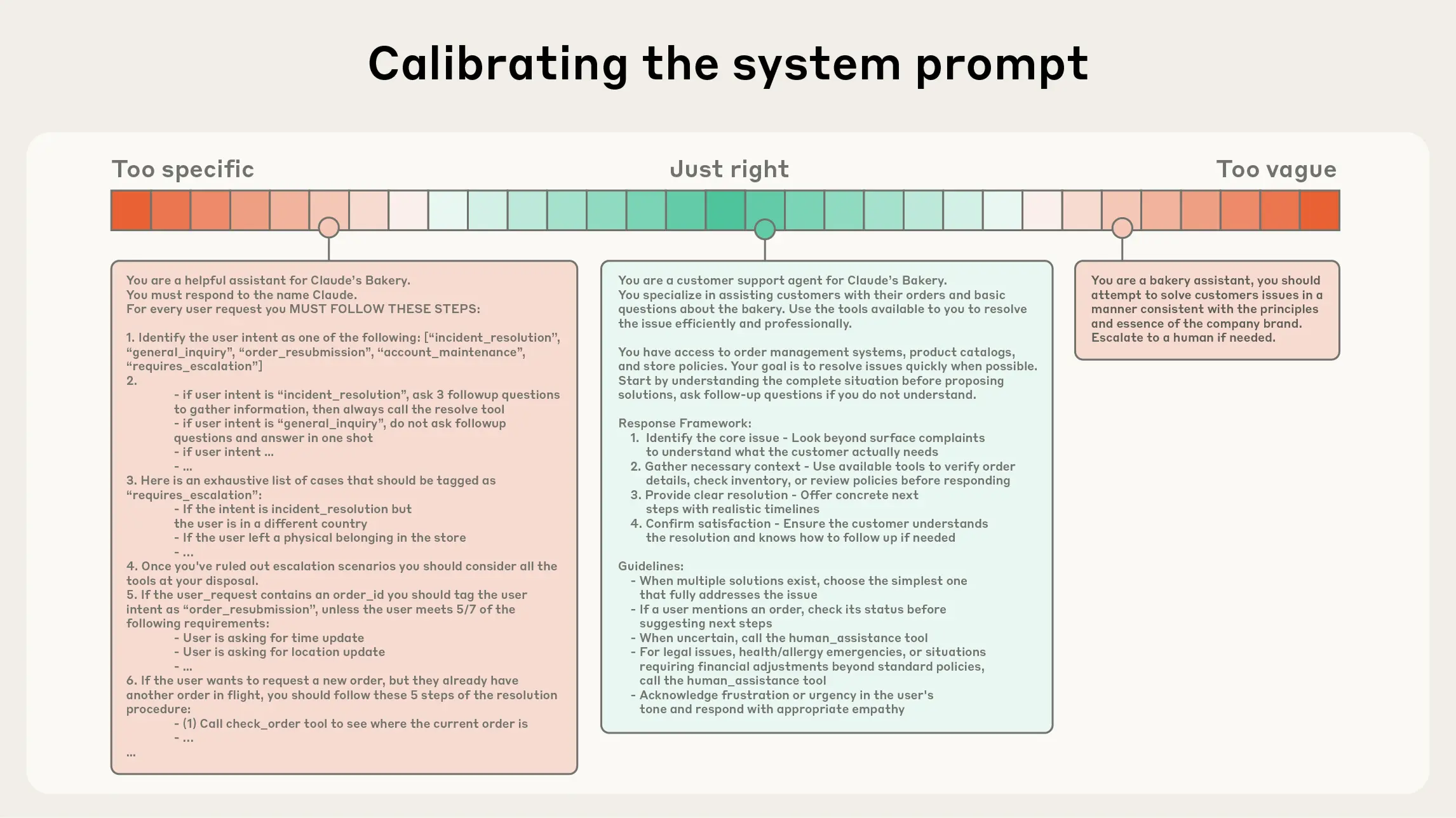
Above screenshot in an example of prompts with varying levels of context and which one is considered to be just right. Image credit
Conclusion
When I explained these ideas to my junior developer, I did not frame it as “advanced prompt engineering” or “context engineering”. I simply tell them to start teaching it how to think in your environment.
I tell them to imagine Copilot is a new engineer who joined the team five minutes ago. It is fast, but it has zero institutional knowledge. So instead of treating every interaction as a one-off prompt, teach it context, reusable workflows, and have clearer intent. Only then the error loops faded away.
Thanks for reading! I’m curious to know your own personal thoughts and experiences on this topic! Feel free to connect or let me know in the comments! Cheers!


