AEO in Practice: How I Made My Blog Agent-Ready
I scanned my own blog to see whether an AI agent could actually read it. The answer was no, and fixing it taught me more about my own site than any SEO audit ever has.
Welcome back to another Articles by Victoria, the place where I randomly write things I'm curious about.
A while back I wrote 5 Ways to Beat AI-driven Search Engines, which was about staying visible when Google's AI Overviews answer the question before anyone clicks. That article was about search. Everything in it assumed the thing visiting my blog was either a person or a crawler that wanted to rank me.
Something has shifted since then. A growing share of what visits my blog is neither. It's an agent: something reading my post on someone's behalf, deciding whether to cite me, and quite possibly never rendering my CSS at all.
I had an enjoyable catchup session with my friend the other day. He told me that Cloudflare put a number on this in their post announcing AEO tooling: fewer than half of HTML requests now come from humans. That statistic sat uncomfortably with me, because I had spent years optimising my blog entirely for the other half.
So I did the obvious thing. I scanned my own site to see how it looked to an agent, using isitagentready.com. It gave me a wall of red.
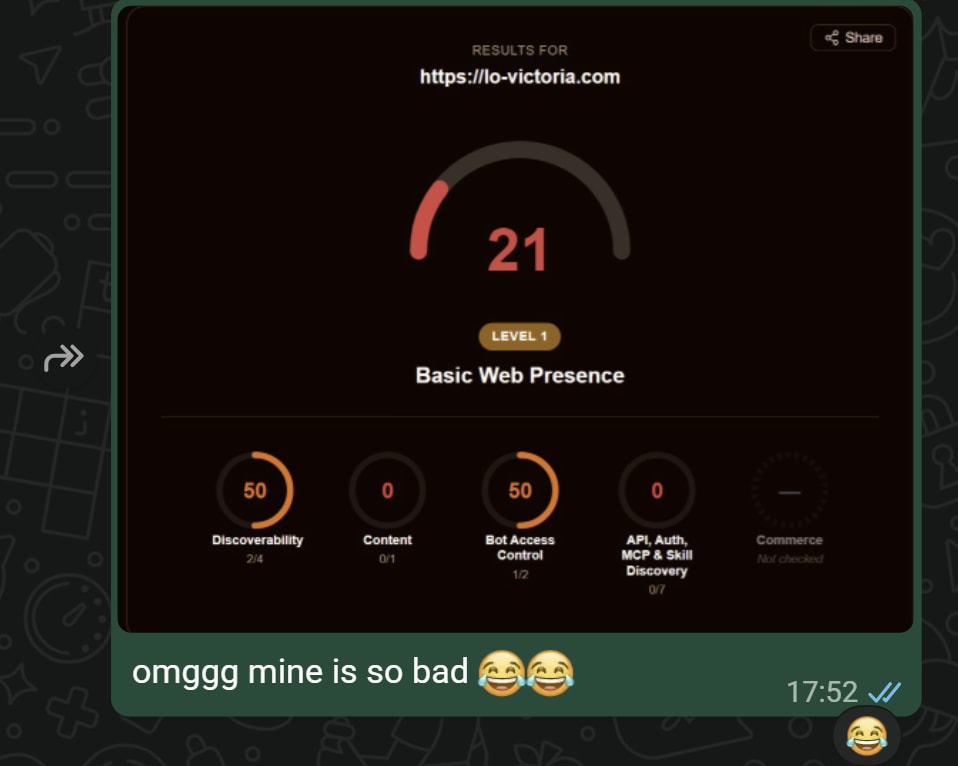
21 out of 100. Level 1 of 5. Content accessibility: a flat zero. This is the message I sent my friend roughly five minutes after running the scan.
This article is what I fixed, why, and the part I find more interesting: the checks I deliberately left failing.
First, what AEO actually means
AEO stands for Answer Engine Optimization. Where SEO asks "will I rank on a results page", AEO asks "will an AI assistant find me, read me, and be willing to recommend me".
Cloudflare frames the shift like this:
Discoverability used to mean ranking on a results page. Now it means being found, read, and confidently recommended by the agents that guide your customers.
There are really two halves to it, and it took me a while to separate them:
- Visibility: are AI assistants citing you at all? Cloudflare measures this with things like Citation Rate and Share of Voice. This is the closest cousin to traditional SEO, and it's largely downstream of writing genuinely useful things.
- Readiness: can an agent use your site? Are your machine-readable endpoints there, do they return the right content types, is your robots.txt coherent?
The second half is engineering, and it's the half I could act on in an afternoon. That's what isitagentready.com measures.
The scan
The tool has a web UI, but it also has an API, which is what I ended up using because I wanted to re-run it after every deploy:
curl -s -X POST https://isitagentready.com/api/scan \
  -H 'content-type: application/json' \
  -d '{"url":"https://lo-victoria.com"}' | jq .
It returns a set of checks grouped into categories (discoverability, contentAccessibility, botAccessControl, discovery, commerce), each pass, fail, or neutral, plus an overall level from 1 to 5.
The neutral status turned out to be important for my sanity. Five of my checks are commerce protocols (x402, ACP, UCP, AP2, MPP) which are for sites that sell things to agents. A blog isn't failing those. It simply isn't in that business.
My first scan had a lot of genuine red though. Let me go through the ones I fixed.
The change that mattered most: serving markdown
This is the one I'd tell every technical blogger to do first, and it's almost embarrassing how obvious it is in hindsight.
My posts are written in markdown. I write markdown, a build step turns it into HTML, and readers get the HTML. When an agent fetched one of my articles, it received the rendered page: my navigation, my footer, my newsletter signup form, my analytics scripts, and roughly 40KB of framework markup, all of which it had to strip before reaching a single sentence I actually wrote.
Meanwhile the clean markdown source was sitting right there on my server. I was converting it away before handing it over.
The fix is HTTP content negotiation. If a client asks for markdown, give it markdown:
curl -H "Accept: text/markdown" https://lo-victoria.com/evolution-of-llms
That now returns the post's markdown source with a small header block on top (publish date, series, tags, canonical URL), and the response carries Content-Type: text/markdown plus x-markdown-tokens, an estimated token count so an agent can decide whether the article fits in its context before committing to reading it.
Browsers are entirely unaffected. They never send Accept: text/markdown, so every human reader still gets exactly the page they got before. Same URLs, same HTML, same everything.
One subtlety I want to flag, because I nearly got it wrong and it would have cost me money. The obvious way to implement this is to add Vary: Accept to your HTML responses so caches know the response depends on that header. The problem is that browsers send wildly different Accept strings (Chrome, Firefox and Safari all differ), so varying my HTML on that header would have multiplied my CDN cache entries per URL and pushed traffic back onto serverless functions. My blog has a history of exactly that problem pinning my function invocations at 100% of quota.
I ended up doing the negotiation in edge middleware, which rewrites markdown requests to their own path before the cache lookup. The two representations end up on separate cache keys, so neither can be served in place of the other, and my HTML cache stays intact.
If you take one thing from this article: your posts are already markdown. Serve them.
Telling agents what they may do with my writing
The next fix was robots.txt, and this one is less about plumbing and more about stating a position.
Content Signals is a vocabulary for declaring how your content may be used, expressed as a directive inside your robots.txt. Mine now says:
User-agent: *
Content-Signal: search=yes, ai-input=yes, ai-train=no
Allow: /
Three separate preferences, and I want to be clear about why I picked this particular combination:
search=yes: index my posts and link to them. Obviously yes.ai-input=yes: fetch my page to ground an answer, as long as the answer cites and links back. Also yes, and honestly this is the whole reason I did any of this work. If an assistant is going to answer someone's question about React hooks, I would very much like it to be reading my article while it does.ai-train=no: don't retain my writing in a training corpus. This is the one I decline.
That distinction between grounding and training is the crux of it for me. Grounding means my article is read, used, and attributed, and a reader can click through to me. Training means my writing is absorbed into weights with no attribution and no path back. One of those supports a blog. The other quietly replaces it.
It's worth being honest about what this is: a stated preference, not a technical control. Nothing enforces it. Some operators treat it as licence terms. Others will ignore it entirely. I still think declaring it beats leaving the question unanswered.
Leaving a trail of breadcrumbs
Several of the remaining checks are all versions of the same idea: an agent landing on your homepage shouldn't have to guess where your machine-readable things live by probing well-known paths one 404 at a time.
Link response headers (RFC 8288) are the cheapest possible version of this. My homepage now returns:
Link: </.well-known/api-catalog>; rel="api-catalog"; type="application/linkset+json",
      </openapi.json>; rel="service-desc"; type="application/json",
      </api-docs.md>; rel="service-doc"; type="text/markdown",
      </.well-known/agent-skills/index.json>; rel="describedby",
      </rss.xml>; rel="alternate"; type="application/rss+xml",
      </about>; rel="author"
An agent that fetches / and reads the headers now knows where everything is without parsing a byte of HTML. I stuck to IANA-registered relation types so a client doesn't need to understand a vendor extension to follow them.
An API catalog (RFC 9727) at /.well-known/api-catalog, served as application/linkset+json, which lists my public read API along with its OpenAPI description, its prose documentation and a health endpoint. To make that catalog honest I also had to build the things it points at: an /openapi.json, an /api-docs.md, and an /api/status. A catalog whose links 404 is worse than no catalog.
Two decisions inside that work that I think generalise:
Everything projects from one source. I have five artefacts describing the same API in four formats. Written independently, they drift within a month. You rename an endpoint, fix it in the catalog, and the OpenAPI document stays wrong. So the endpoint list lives in exactly one module and every document is generated from it.
My robots.txt was contradicting my catalog. I had a blanket Disallow: /api/, written back when I assumed nothing good came from crawling an API. But I was now publishing a catalog inviting agents to call those exact endpoints. Inviting a caller through the front door while robots.txt tells them to stay off the path is incoherent, so the public read endpoints are explicitly allowed now. The private ones stay disallowed, and stay protected by tokens, which is what actually protects them.
And one more thing that isn't in any spec but matters if you care about SEO: crawlable and indexable are different questions. My API endpoints need to be crawlable so agents can read them. They absolutely should not be indexed. /api/search returns all 250 of my post titles as raw JSON, which as a Google result would be thin, duplicative content competing with the posts themselves. So every machine-facing URL now carries X-Robots-Tag: noindex, and none of my actual pages do.
Amusingly, the Allow in robots.txt is what makes that noindex work at all. Google has to be permitted to fetch a URL in order to read the header telling it not to index the thing.
Skills: telling an agent the cheap path
This one was new to me. The Agent Skills discovery convention lets you publish an index at /.well-known/agent-skills/index.json listing markdown documents that explain how to work with your site, each with a sha256 digest so a client can verify it got what was advertised.
I wrote two real ones rather than filler:
read-victoria-blog: how to find and read my articles efficiently, and how to cite them.follow-victoria-blog: how to notice when I publish something new, cheaply.
Writing them was unexpectedly clarifying, because a skill is where you write down the thing you wish every visitor knew. For example: my /api/search endpoint returns the title and slug of every published post in a single response. If you want to know whether I've written about a topic, that's one request. Without being told, an agent will page through /api/posts, or worse, crawl 250 HTML pages to find out.
The skills also say what not to do: don't scrape my HTML, ask for markdown; don't guess slugs, they're long and specific; don't poll /api/search on a schedule when /api/status exists precisely so you don't have to.
The digests are computed at request time from the same bytes that get served, which means the hash can never be stale. A build-time manifest drifts the moment someone edits the markdown without regenerating it.
WebMCP: tools for an agent driving the browser
The last thing I passed is WebMCP, which is a different shape of problem. An agent operating inside a reader's browser (a browser extension, an in-page assistant) can't always reach a cross-origin API, but it can call a tool the page itself registered.
So my pages now register four tools via navigator.modelContext.provideContext(): search posts, read a post as markdown, list recent posts, and list my collections.
Two deliberate constraints. Every tool is read-only: nothing writes, nothing touches my admin API. And the whole thing is guarded, because the API is unshipped outside Chrome behind a flag; on a browser without navigator.modelContext the component mounts, finds nothing, and does nothing.
What I refused to add, and why
Here's the part I actually want to argue for, because I think it's where most agent-readiness advice goes wrong.
Six checks on my report still say fail. I could clear four of them this afternoon by publishing four JSON files. I'm not going to, because every one of them would be a lie.
OAuth and OpenID Connect discovery
/.well-known/openid-configuration and /.well-known/oauth-authorization-server describe an authorization server: an issuer, an authorization endpoint, a token endpoint, a JWKS URI.
I don't have one. My blog has a private admin API that publishes posts and sends my newsletter, and it authenticates with a fixed bearer token that I issued by hand, accepted only from one IP address, my own agent's VM. That's the entire system.
To pass this check I would have to invent endpoint URLs. An agent that followed them would get a 404 at the token endpoint, having been told by my own site's discovery metadata that OAuth was available. That is a strictly worse outcome than the absent file, which correctly signals "no OAuth here". A missing file is information. A file full of fiction is a trap.
Doing it properly would mean standing up a real identity provider to issue scoped tokens for an API with exactly one caller. That's a feature with running costs and a security surface, and it buys my blog nothing.
OAuth Protected Resource metadata
This one is interesting because I built it, deployed it, and then deleted it.
RFC 9728 metadata was defensible in a way the above isn't, because I could describe my API as a protected resource honestly, with no fabricated authorization server, because that field is optional in the spec.
Then I looked at what it actually published. It named no private paths, but it did state that an admin API exists with read, write and publish permission levels. The only things behind authentication on my blog are my drafts editor and my newsletter tooling, and neither is meant to be visible. I was advertising the shape of my owner-only surface to an audience that structurally cannot use it, since every agent reaching my origin is unauthenticated by definition.
To be precise about the reasoning, because it's easy to muddle: this is disclosure minimisation, not a security control. The token and the IP allowlist are the protection, and they're unaffected either way. Removing the descriptor doesn't make my drafts safer. It just declines to hand out a map for no benefit.
The same logic sent me back to my robots.txt, where I found Disallow: /drafts, which meant that file, readable by anybody, was the only place on my entire site announcing a drafts page existed. That line is gone too. The page carries noindex instead, which is more effective at keeping it out of Google, because a disallowed URL can still be indexed from an external link while a crawler that's allowed to fetch it will read the header and drop it.
MCP Server Card
An MCP Server Card advertises a serverInfo, a transport endpoint, and a capability set.
I do have an MCP server for this blog. It runs over stdio on my own VM, it holds my admin token, and it is not reachable over the network. There is no URL to put in the card. Publishing one would send every MCP-aware agent to an endpoint that doesn't answer, failing at connection time.
I could build a public read-only MCP server wrapping the same four operations I already expose through WebMCP. But that's a public, always-on endpoint to maintain and secure, in order to offer read access that /api/search and markdown negotiation already provide over plain HTTP. For a personal blog that's a net loss.
A2A Agent Card
Same reasoning, shorter: an Agent2Agent card describes an agent you operate for other agents to talk to. I don't run one.
auth.md
This one is my favourite failure, because it's the closest to genuinely passable and it still shouldn't pass.
I do serve /auth.md, and it is real markdown. Fixing it got interesting in stages. My first version failed because the convention identifies the document by an H1 containing the literal string auth.md, and mine said # Authentication, which is better English and the wrong label. Fair enough, I renamed the heading.
The check then advanced to its real requirement: the document must describe agent registration: a register_uri, supported identity and credential types, claim and revocation URLs. There is no signup for my blog. There is no URL that will issue you a credential.
So my auth.md says the useful true thing instead. Everything readable on my site is public and needs no credential. There is no API key to request and no account to create. And if you hit a login page, that isn't a rate limit or a misconfiguration. It's the answer, and the page isn't for you.
DNS-AID
The last failure isn't a decision at all, it's a blocker. DNS for AI Discovery wants SVCB records under an _agents label so an agent can discover your entrypoints over DNS before making an HTTP request.
Nothing in my repository can publish those, because they live in my DNS zone. My domain is on Namecheap BasicDNS, which doesn't offer SVCB record types in its editor, and my zone isn't DNSSEC-signed. Passing this check means moving my DNS to a provider that supports both, which would be Cloudflare, ironically. It's on the list, but it's a migration, not a config line.
A failing check is not automatically a to-do item. These specs are written for businesses with storefronts, APIs and identity providers. A personal blog's honest answer to "where do agents authenticate?" is "they don't need to."
Where I landed
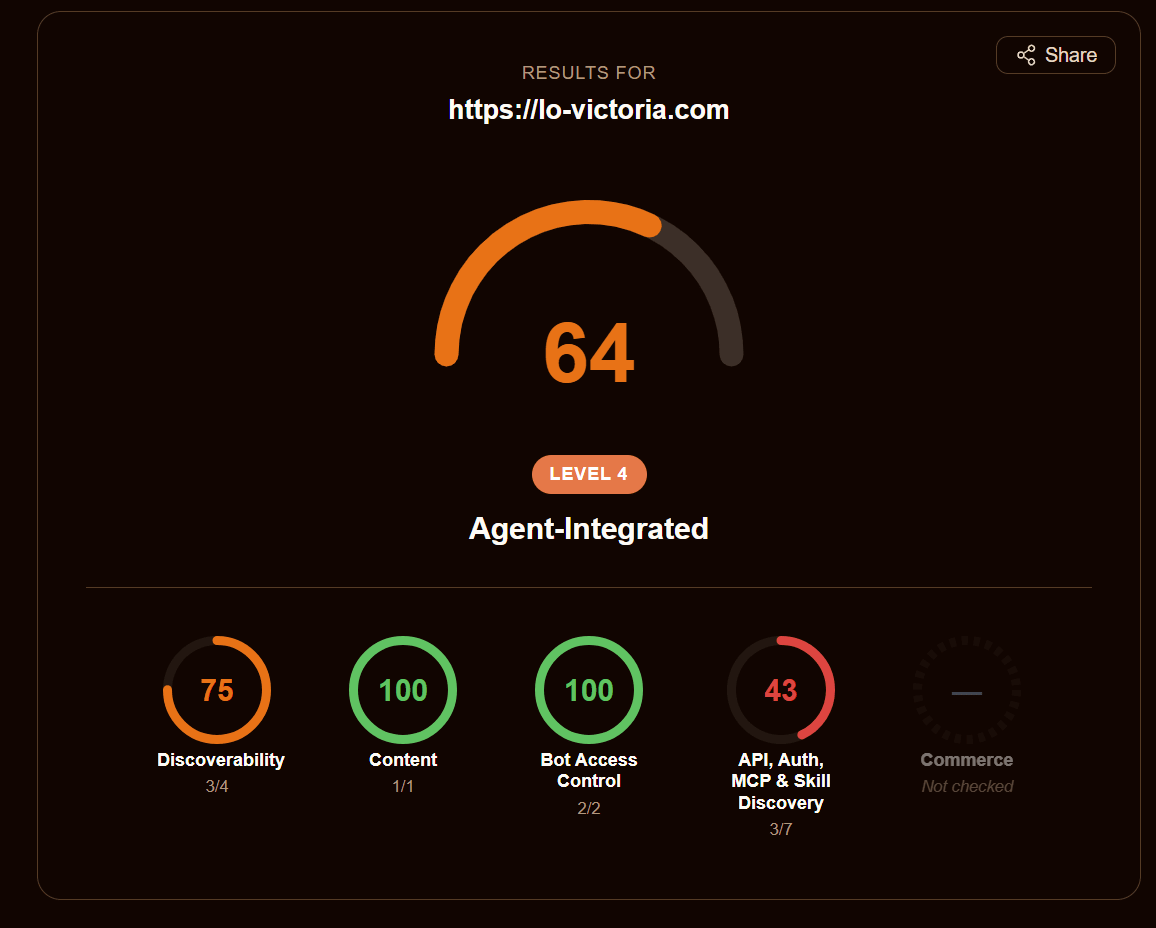
64, up from 21. Content accessibility went from a flat zero to full marks, and bot access control is green. The 43 is the discovery category, which holds five of the six checks I just explained I won't be passing. The sixth is DNS-AID, and it's the single point missing from discoverability.
My blog now sits at level 4 of 5, "Agent-Integrated", with nine passing checks:
| Category | Passing |
|---|---|
| Discoverability | robots.txt, sitemap, Link headers |
| Content accessibility | markdown negotiation |
| Bot access control | AI crawler rules, Content Signals |
| Discovery | API catalog, agent skills, WebMCP |
Six fail (the five I described plus DNS-AID), and six are neutral: Web Bot Auth, and the five commerce protocols that don't apply to a blog.
Level 5 requires auth.md, an MCP Server Card and an A2A Agent Card. All three would mean advertising services I don't run. So level 4 is my ceiling, and I'm at peace with it. The gap between 4 and 5 isn't a quality gap. It's a question of whether you host agent-facing services, and I don't need to.
Verdict: AEO is mostly just honesty
When I wrote about beating AI Overviews, my conclusion was that SEO is changing rather than dying. I'd say something similar here, with a twist.
SEO was a game of signals: the right keywords, the right structure, the right metadata to persuade a ranking algorithm. A lot of it rewarded looking better than you were.
AEO doesn't reward that, because the failure mode is immediate. If you claim an endpoint exists, an agent calls it and gets a 404, and now your site is the one that lied. There's no ambiguity to hide in. The whole exercise turned out to be less "optimise for the machines" and more make true, precise statements about what your site is and what you're willing to have done with it, in a format something other than a browser can read.
Which is why my favourite part of this work isn't the nine green checks. It's auth.md, a file whose entire content is "you don't need to authenticate, there's nothing here to sign up for, and if you're seeing a login page you've wandered somewhere that isn't for you." It fails its check. It's the most useful thing on the list.
If you want to try this on your own blog, scan it first (isitagentready.com takes about a minute), then start with markdown negotiation and Content Signals. Those two are the highest value per hour by a wide margin, and neither one requires you to pretend to be something you aren't.
Thanks for reading! I'm curious to know your own thoughts and experiences on this topic. Feel free to connect, send me an email (my inbox is always open), or let me know in the comments. Cheers!
Let's Connect!
Mentioned Resources
- Is It Agent Ready? - the scanner I used throughout
- Cloudflare: Answer Engine Optimization and agent readiness - the post that framed all of this for me
- Content Signals - the
ai-train/search/ai-inputvocabulary - RFC 8288: Web Linking - the
Linkresponse header - RFC 9727: API Catalog -
/.well-known/api-catalog - Agent Skills - the skills discovery index
- WebMCP - in-browser tools for agents
- Markdown for Agents - Cloudflare's write-up of the
Accept: text/markdownpattern - 5 Ways to Beat AI-driven Search Engines - the SEO-side companion to this article